Thursday, May 25, 2006

NotesTracker Guide Version 4.4 update (25 May 2006)

For all NotesTracker users and evaluators ...

An updated edition of the NotesTracker Guide for Version 4.4 is now available for download. Get it from either of:
There are some better explanations in paragraphs here and there, but the biggest improvement is in the Developer Topics section. The steps for implementing NotesTracker design modifications in a target database have been concisely listed in a table near the start of the section. Also, the changes needed for the tracking of View Opens have been moved up so that they now form part of the list of steps.

The intent is to lay out a clearer picture of the total NotesTracker design change process. Your comments, impressions and any suggestions for improvement would be most welcome.

Note: please watch out for a maintenance release of NotesTracker -- Version 4.43 -- to be made available in the coming week or so. Apart from some minor cosmetic changes, V4.43 fixes a bug in the tracking of Domino database field changes made via a Web browser.

After that, focus will be on completing Version 5.0 of NotesTracker.

Tuesday, May 16, 2006

Notes Presenter (initial Beta version released)


Please visit the following link to find out more about our new freeware application ... Presenter for IBM Lotus Notes otherwise known as Notes Presenter:

http://notestoneunturned.blogspot.com/2006/05/notes-presenter-lets-eat-our-own-dog.html

Saturday, April 29, 2006

"Simple Signer" - Freeware tool to easily sign Lotus Notes databases

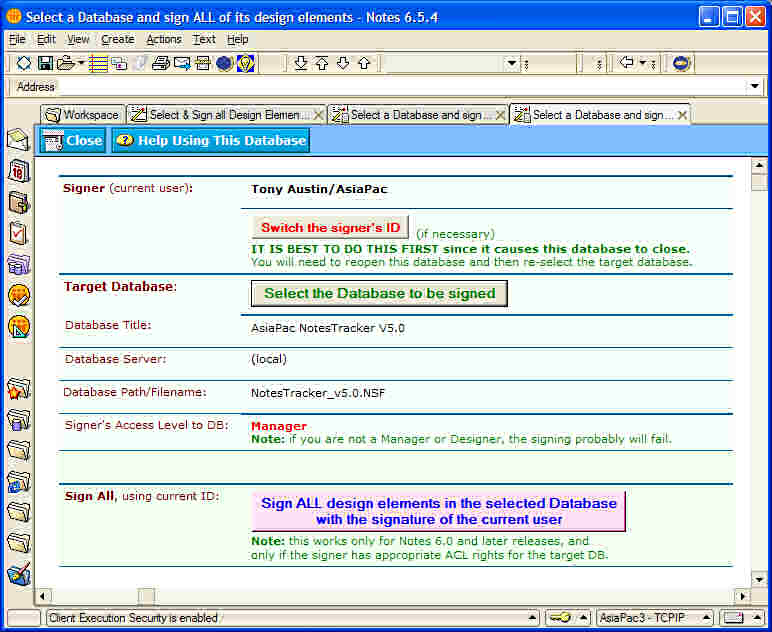
CLICK THE IMAGE to see an enlarged version.
This is a deliberately simple tool enabling you to select any Lotus Notes database -- local, or on a Lotus Domino server -- and then to sign all of that database's design elements (forms, views, agents, etc).

It has a single purpose: to make the database signing process as easy and strightforward as possible, even for Lotus Notes users with little or no technical background. Following the KISS principle it's "a simple tool for a single task."

And it's free for you to use wherever and however you like... ENJOY!

You can download the the "Simple Signer" tool from either http://asiapac.com.au/Simple_Signer_Download.htm (Australian server) or http://notestracker.com/Simple_Signer_Download.htm (USA server).

The User Guide can be downloaded from http://asiapac.com.au/Downloads/Sign_all_design_elements_in_a_Notes_database.pdf or http://notestracker.com/Downloads/Sign_all_design_elements_in_a_Notes_database.pdf

And while you're at the site help us out by taking a look at NotesTracker, and requesting an evaluation copy!

---------------------------------------------

WANT TO SIGN ONLY SPECIFIC DESIGN ELEMENTS?
If you want a more granular tool for your Notes database signing requirements, then you really should consider purchasing a copy of signEZ from Ytria. It has great flexibility in the way that you can select and filter specific types of design elements.

Wednesday, March 15, 2006

NotesTracker V5 -- An ides of March progress report

Unlike Julius Caesar's terminal experience in 44 BC, there are no bad omens for NotesTracker at the ides of March in 2006!

Progress has been steady. Not only have we been adding some powerful new functionality, but we've also been taking the time to improve code modularity for easier maintenance and extendability.

We've also been revamping some of the existing features to make them work better and display information more effectively. Thus in the NotesTracker Repository database you'll find a much improved navigator design. As well, all of the repository's views were checked carefully and tweaked where beneficial to information presentation.

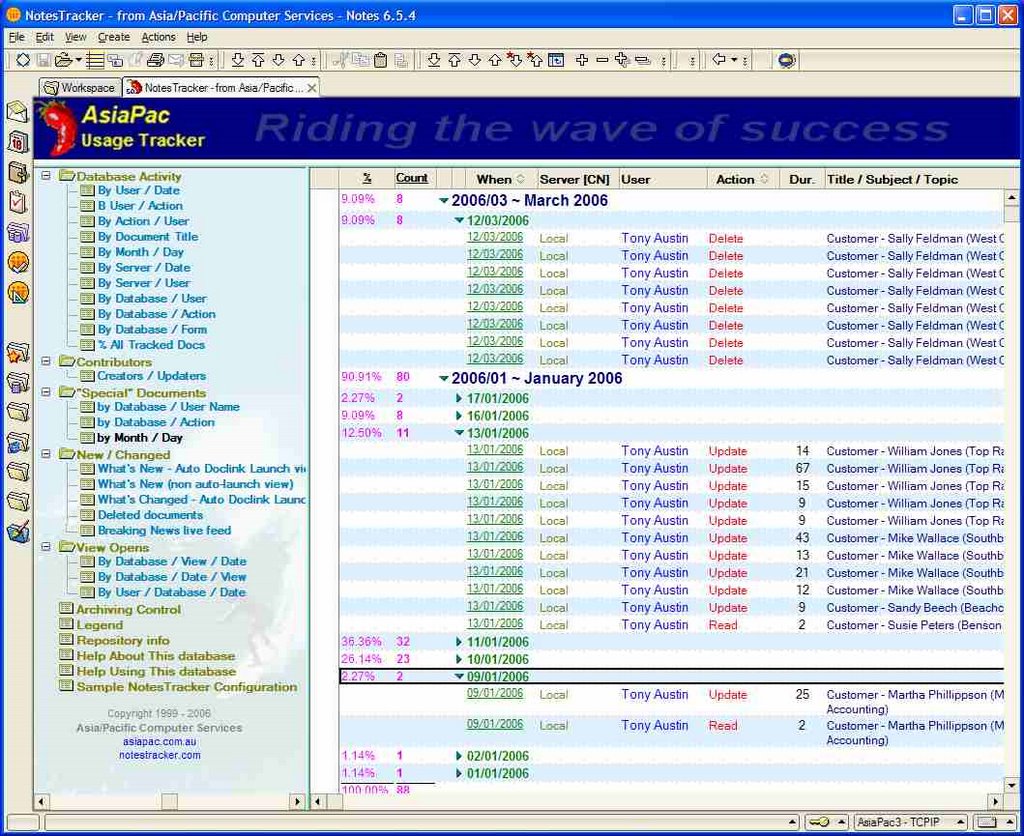
Here's one example, the improved-look navigator, showing the new "Special Documents" views:

'(Click
"What is meant by special documents?" you might ask.

Well, in NotesTracker V5 you can easily signify that specific documents in a tracked database are "special" to you -- simply by placing a new control field into those documents and, programatically or otherwise, setting some appropriatively descriptive (non-blank) text into the field. Doing this will be "as easy as falling off a log" just like everything else in NotesTracker.

A couple of examples: there may be certain servers in your Domino network that have special importance (hubs, etc), so you will want to closely monitor any field changes made to their Server Documents. Or there may be certain customers in a sales database that you wish to focus on so as to track their orders, or complaints, or anything else about them that is important to you. The thre "special documents" views enable you to passively monitor such documents.

What's more, in NotesTracker V5 there is also e-mail alerting: that is, the automatic generation of e-mail messages whenever a "special document" is acted upon (deleted, updated, etc) even down to being alerted only if certain fields that you specify are updated.

So this forthcoming release moves NotesTracker from reactive to proactive monitoring and auditing of your database contents!

Monday, March 06, 2006

Controlling the size of a NotesTracker Repository database

Two recent IBM developerWorks articles are a must-read for Notes/Domino developers (and also very important for administrators):

In the second article, under the heading View Performance Testing the point is made that:


The biggest "performance killers" in terms of view indexing are categorized columns. Sort columns add a small amount of overhead as do some other features, such as the Generate unique keys option.
There are two accompanying charts that reinforce this statement. The first one displays View index size versus response times and we see that the categorized views (the two rightmost bars) having index sizes considerably larger than those of comparable non-categorized views:

View index size versus response times (click to enlarge)
Column sorting uses far less resources than view categorization, as shown by the shorter bars in the chart. (The other chart shows View size versus refresh time and demonstrate that the categorized views also have distinctly longer response times.)


In a NotesTracker Repository database -- assuming that you retain the database design as distributed -- the usage log documents are shown via a dozen or so Database Activity views. These views select all of the usage log documents in the repository, whereas the other views select subsets of usage log documents (in some cases quite small subsets) and should not have all that much impact on the repository's size.

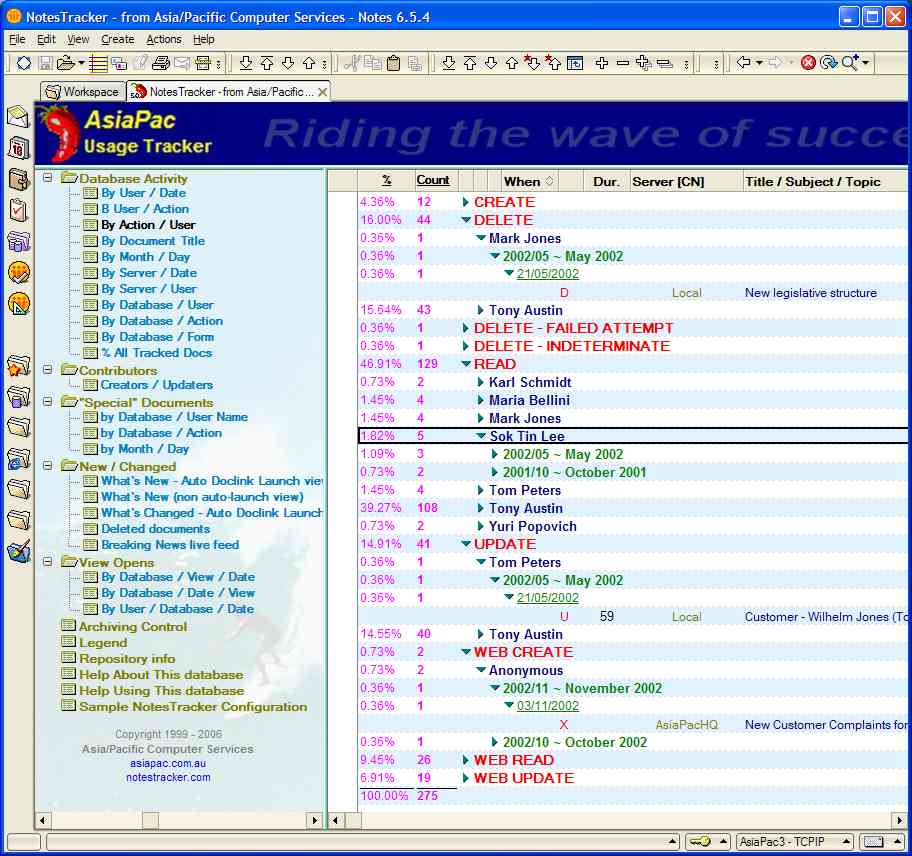
Here's a typical view, the Database Activity by Action / User view (shown with the new navigator coming in NotesTracker Version 5.0):

NotesTracker Version 5.0 sample categorized view (click to enlarge)

One user of NotesTracker has reported that it only took around 55,000 usage log documents for their NotesTracker Repository database to reach a size of 1 GB, so you may see a need to somehow minimize the database's size.


In light of the findings about categorized views described in the articles, if you feel that you want to reduce the size of any of your NotesTracker Repositories, one good way way to do so would seem to be by deleting unwanted and/or infrequently-used categorized views from the repository's database design. (You could might gain some advantage by implementing some of the other techniques described in the two articles.)

We would be very interested in recieving your feedback if you try doing any of this.

Sunday, March 05, 2006

Comprehensive Notes Mail monitoring, via NotesTracker

The IBM developerWorks article Discover the power of Calendar Delegation in Lotus Notes shows you how to how to setup and use the Calendar Delegation feature in the Lotus Notes client to grant another Notes user access to your mail file and act on your behalf.

The article starts off:


"One of the most powerful tools in the IBM Lotus Notes client is the Calendar Delegation feature. Calendar Delegation allows you to grant another Notes user access to your mail file, enabling the delegated user to view and edit your calendar data, send email messages on your behalf, and act as a manager of your mail and calendar data. This scenario is typical in the case of an executive who employs an administrative assistant to schedule his meetings and appointments and to respond to non-confidential email messages. To allow the administrative assistant to manage his Notes mail file, the executive specifies the assistant as a delegate for the mail file. In turn, the administrative assistant may be responsible for managing several users' calendars, particularly if he supports several executives."

Naturally, the presumption here is that the delegate is trustworthy and this would generally be the case.

Nevertheless there exists the possibility of privacy or data security violation if a delegate for whatever reason, malicious or otherwise, mishandles or exposes the contents of your Notes Mail database.

One North American company justified the purchase of NotesTracker to extend the design of their Notes Mail design template so that all usage of a person's Notes Mail database can be monitored in detail.

As for any database being monitored via NotesTracker, they can audit each and every database document operation -- Create, Read, Delete, and Update (including every field value change).

Authorized people can view what everybody, including yourself, did to your Notes Mail database and keep an archive going back as far in time as required.

This sort of thing is quite simple to do and just "par for the course" with NotesTracker!

So if you have a Notes Mail monitoring or compliance requirement, you should consider using NotesTracker to implement a proven solution to this important need.

Friday, January 13, 2006

NotesTracker V5 progress report - 13th January 2006

Development of version 5 of NotesTracker is well under way. Many of the proposed new features are working (but there's a fair bit more testing, refinement and documentation to do).

One key new feature is the option of nominating individual documents in a database as being "special" so as to be able to focus more on them compared with other documents in the database. This enhancement is in response to a user request to have the ability, while still tracking all document usage, to place greater emphasis on certain documents that for some reason or other are especially important. Certain of their Domino servers play a key role in their network (as might be the case in your Domino network), and it's important to them to be able to closely monitor and control all changes in the Server Documents of these particular servers. (Of course, the same ability to focus on certain specific "special" documents would be widely applicable to other sorts of databases as well.)

Another enhancement will be the ability to track the Pasting of documents has been added to the previous list of actions trackable via NotesTracker: document Updates, Creates, Deletes and Reads (not to forget View Opens).

Right from the start (NotesTracker V1) you could always passively view database actions as soon as they appeared viewable in the NotesTracker Repository, which would be virtually immediate for a local Domino server or at the enext replication cycle for a remote Domino servers. But with NotesTracker V5 there will be a major new feature: the sending out of e-mail alerts for important tracked events. This brings proactivity to NotesTracker, instead of your having to rely on passively detecting actions while perusing the Usage Log (possibly long after the event).

The proactive sending out of NotesTracker alert messages will be able to be specified for:
  • Any combination of the above document actions (as before, against any and all documents in a database).
  • All actions, or any combination of actions, carried out on "special documents".
  • In the case of updates, the ability to specify a list of important fields -- "trigger fields" -- that cause an alert to be sent whenever any of the fields is changed (rather than just the document as a whole having been updated). This will provide an extremely powerful auditing and control capability!
You can choose to generate the e-mail alerts either "immediately" (synchronously, at the time that an action occurs) or "delayed" (via a scheduled agent, every 5 minutes or at some longer time interval). Which of these two send options you choose is mainly a performance issue.

Much of the NotesTracker code base is being reviewed and touched to make these (and other) enhancements. In the process, quite a few usability enhancements and tweaks are being made.

Sunday, November 27, 2005

Tracking of Rich Text fields

As a deliberate design decision, NotesTracker does not track changes to the full contents of a Rich Text (RT) field, but only the changes to the "plain text" component of each RT field. This was done to minimize the size of the Usage Log (the NotesTracker Repository database).

If the entire contents of each and every RT field in the document were to be logged, this could generate some inordinately large Usage Log documents, since it would be necessary to store the Before and After values for each and every file attachment and embedded object in the field (which in some cases would amount to many MB per Usage Log document).

It was considered that for most usage tracking purposes, it would be sufficient to track only the changes to the "plain text" part of the RT fields. If this is not adequate for a particular databse, then some code changes would be needed (particularly in the "UsageTracker_FieldsAfterUpdate" subroutine).

Thursday, November 24, 2005

Desirable NotesTracker V5 features? Your feedback needed!

This is an invitation to all NotesTracker users -- and also those who have evaluated NotesTracker but perhaps found some feature or capability lacking.

Please let us know ASAP what changes and new features you think NotesTracker needs. Use this blog to post your comments.

To kick things off and get you thinking, here are some possible changes, not in any particular order nor guaranteed to be implemented:
  • e-mail alerts -- for example, when a particular document is updated (or deleted) or when a particular field is updated, or when a specific database or document is accessed by particular person or group? Would this sort of alerting be of any value? How configurable should it be (how detailed should the tracking go for this)? Can you suggest how it might be implemented? Our thinking is that for best performance of tracked databases any such e-mail alerts should be sent asynchronously, say once every 15 minutes or hour? (What frequency would be satisfactory for such alerts?)
  • Sample code for tracking such things a button clicks?
  • Sample code for showing how to enable usage tracking for database accesses carried out via LotusScript agents? (Because NotesTracker is LotusScript-based, it will only be possible to do this with LotusScript, not for Formula Language or other database accesses such as importing documents.)
  • Sample code for adding NotesTracker capabilities to a Notes Mail database (for compliance monitoring, tracking of changes in mail message text, etc). This would make it harder for somebody to get away with falsification of mail violating privacy of mail database owners.
  • Sample code for automatically generating RSS feeds from Breaking News types of views? (And qhat about Atom feeds, is this important?)
  • New field for configuration field for "Tracked Database's Category", so that accesses across multiple databases can be grouped together in the reporting views. (For example, all Human Resource databases, or a all Marketing/Sales databases or all Finance/Accounting databases.)
  • Add a "legend" to the NotesTracker Repository which describes in outline the meaning of the various tracking fields and options?
  • Provide example methods for producing managenent reports and charts from the usage log entries in a NotesTracker Repository?

A lot of thinking has already taken place and a few things have already been developed: an improved "look and feel" for the NotesTracker Repository, and an agent for easily signing the two NotesTracker Web Agents with the appropriate ID for execution in the Domino server environment. (Tentaive V5 release would be mid- to late-first-quarter 2006.)

Over to you for some good ideas!

Friday, November 11, 2005

Announcing the NotesTracker News & Tips weblog

NotesTracker -- from Asia/Pacific Computer Services -- the "universal enabler" for document usage tracking and metrics for your Lotus Notes and Domino database applications.

General product information iabout NotesTracker is available at the following mirror-image Web sites. Choose the server that is more often available or faster for you:
This weblog was set up in November 2005 to provide you with breaking news about NotesTracker, tips and techniques, background information, and to solicit your feedback on NotesTracker (as it exists or what improvements/additions you'd like to see in the product).